
MOI Qatar ID Check – How to Verify Qatar ID Status Online in 2026
MOI Qatar ID Check lets you verify your Qatar ID status using the official Ministry of Interior (MOI) portal. By entering your Qatar ID number or passport details, you can see whether your ID is valid, expired, under process, or blocked. This guide covers the official methods, status meanings, and common issues step by step.
How to Check Qatar ID (QID) Status Online by ID Number – 2026 Step-by-Step Guide
You can check Qatar ID validity, expiry, and residency status by entering your 11-digit QID number on the official Ministry of Interior (MOI) portal.
Step 1: Visit the MOI Portal
Visit the MOI portal by clicking on the below given button or directly go to this website (www.moi.gov.qa). You’ll see this below the given interface.
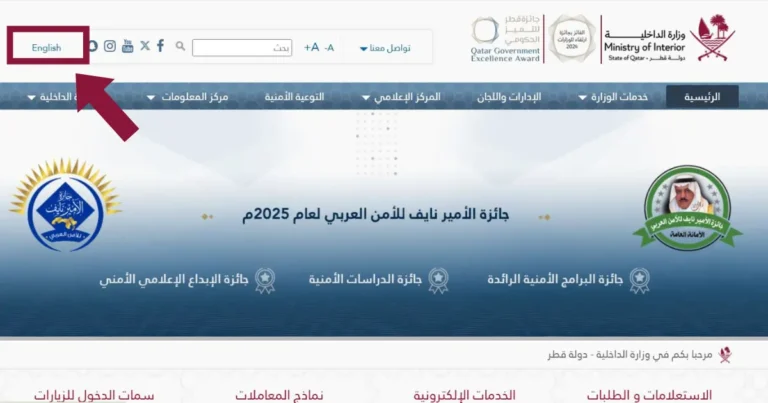
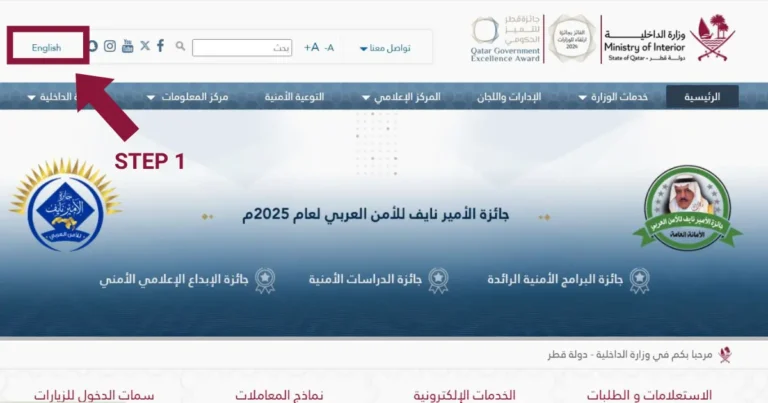
Step 2: Choose Your Language
Choose your preferred language from the top left corner. Both English and Arabic are present.
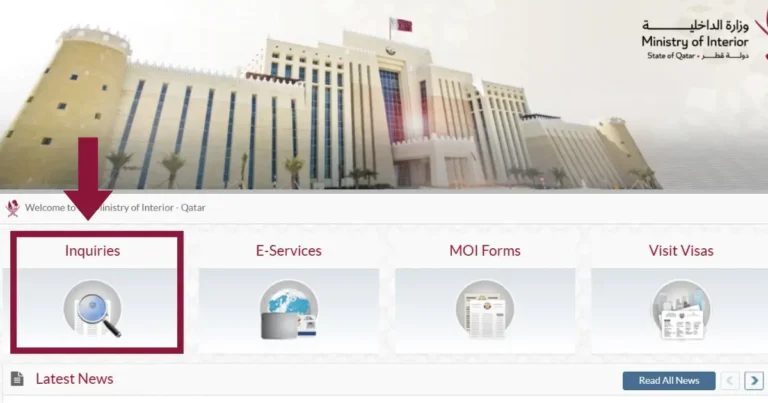
Step 3: Locate Inquiries
Now little bit scroll down and click on the “Inquiries” option.
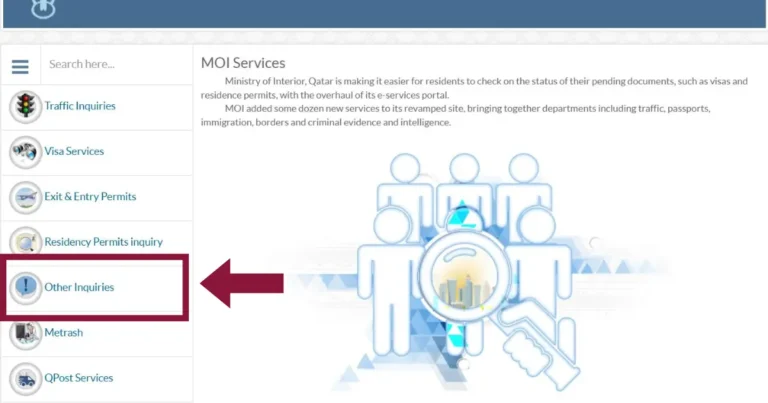
Step 4: Choose Other Inquiries
Click on the “Other Inquiries” option, and you’ll find it on the left side panel.
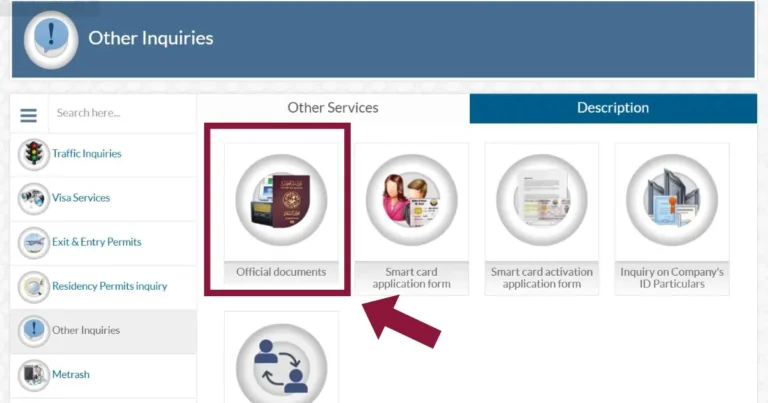
Step 5: Go to the Official Documents
Click on the “Official Documents” from the given below 4 options.
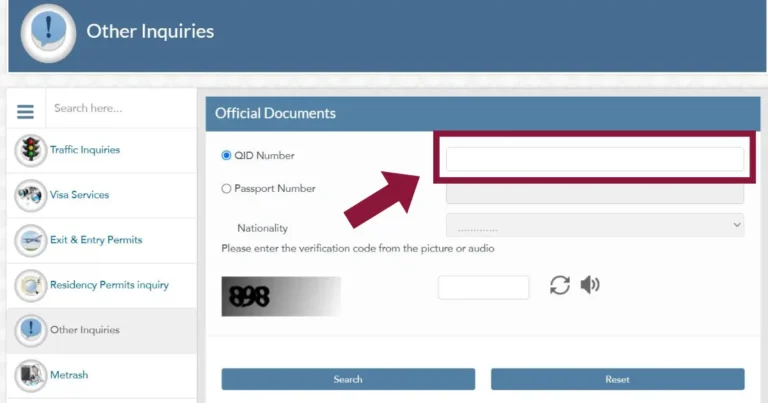
Step 6: Enter 11-Digit QID
Now, enter your 11-digit QID number in the given box.
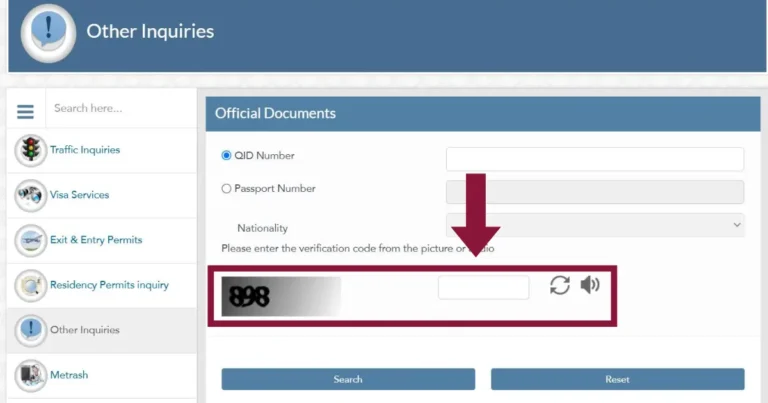
Step 7: Complete the Verification and Search
Complete the verification by entering the captcha from the given image or audio, and click on search.
Step 8: Check the Status
After clicking on search, you’ll get the status of your ID. Check the expiry date, residency, date of birth, passport, and nationality to make sure everything is correct.
- Valid QID → Your Qatar ID is active, and you can use it for work, banking, healthcare, and travel.
- Expired QID → Your Qatar ID is no longer valid, and you must renew it as soon as possible to avoid fines and service interruptions.
- Blocked QID → Often related to sponsorship issues or administrative restrictions. Contact your sponsor or the MOI helpline for clarification.
Troubleshooting
- Portal not loading? Disable VPN or try again without a proxy.
- Invalid QID error? Make sure all 11 digits are correct, and there are no spaces.
- Still no result? Try the Metrash app or visit the MOI service center.
How to Check Qatar ID Status by Passport Number: MOI 2026 Guide
If your Qatar ID has not been issued yet, you can check your record using passport number and nationality through the official Ministry of Interior (MOI) portal.
Step 1: Visit the MOI Portal
Open the official Ministry of Interior website at www.moi.gov.qa to start the passport-based Qatar ID check.
Step 2: Choose Your Language
Choose English or Arabic from the language selector at the top of the MOI website.
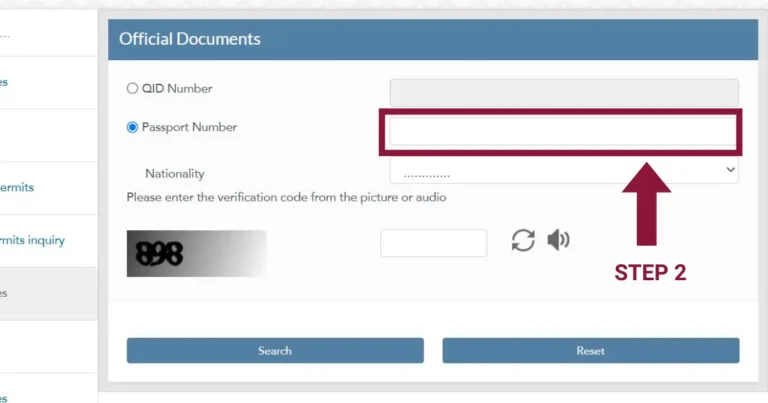
Step 3: Enter Passport Number
Enter your passport number exactly as shown on your passport, without spaces or special characters.
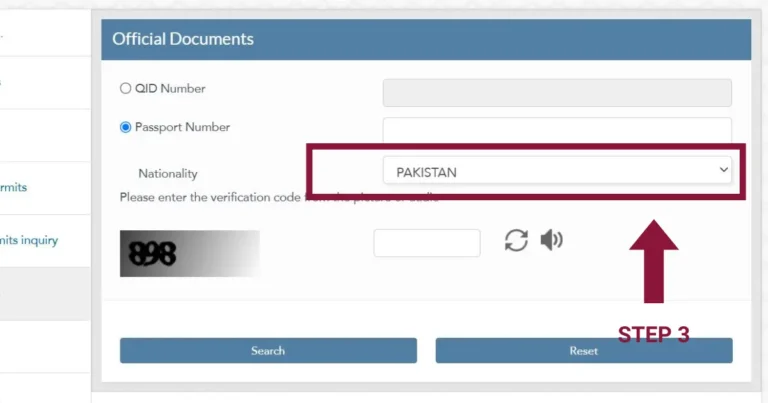
Step 4: Select Your Nationality
Select your nationality from the drop-down list to ensure accurate record matching.
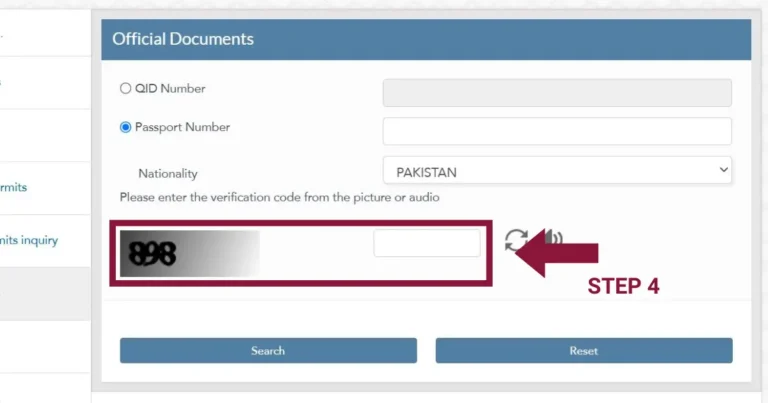
Step 5: Complete the Captcha
Complete the CAPTCHA verification and click Search to submit your request.
Step 6: Search the Status
Review the displayed results, including residency status, personal details, and any pending Qatar ID updates.
- Matching record → Your Qatar ID may still be under processing. You can track updates through the Metrash app or with your sponsor.
- No results → Use the reset option and re-enter your passport details, or confirm the information with your sponsor.
- Visa expiring soon → Consider renewing early to avoid delays or service restrictions.
Note: If no results appear, click the Reset button on the MOI website and re-enter your passport details carefully. Temporary system delays or incorrect inputs are common causes.
How to Check Qatar ID Status Using the Metrash App in 2026
Metrash is the official Ministry of Interior (MOI) mobile app that allows registered users to view Qatar ID status, residency details, and a digital ID copy.
Below is a step-by-step guide to check Qatar ID status using the Metrash app.
Step 1: Install the Metrash App
Open the Google Play Store or Apple App Store and search for the official Metrash app published by the Ministry of Interior. Install the app on your mobile device to access Qatar ID services.


Note: The Ministry of Interior has merged Metrash2 into the Metrash app. Metrash is now the official mobile application used for MOI digital services.
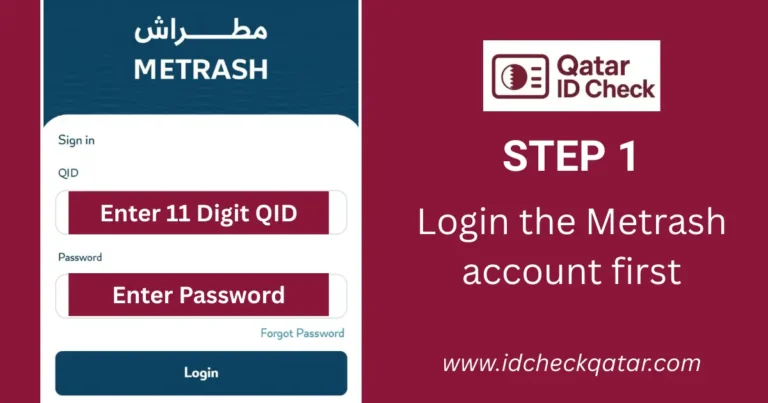
Step 2: Log in to the Metrash
Open the app and enter your Qatar ID number and the mobile number registered with the Ministry of Interior. If you are a new user, complete the registration by verifying your mobile number. Existing users can log in using their Qatar ID number and password.
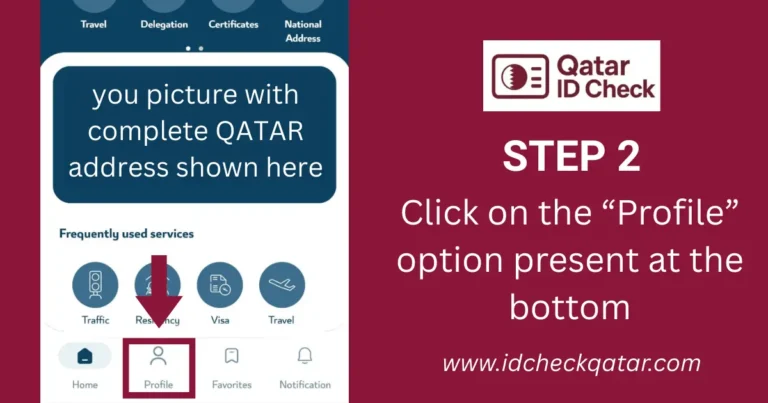
Step 3: Click on Profile
After logging in, tap the Profile tab from the bottom menu. This section shows your personal information along with your Qatar ID details.
Step 4: Choose Wallet
Open the Wallet section inside your profile. Here you can find your digital Qatar ID card, which includes your personal information and ID validity.
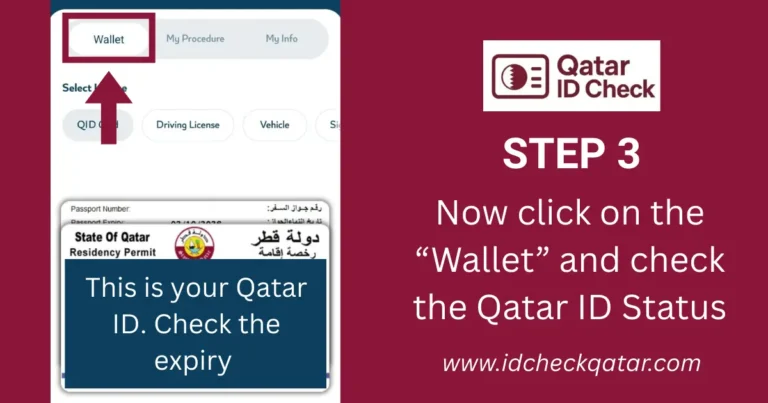
Step 5: View Your Qatar ID Card
Inside the Wallet, tap on the Qatar ID card to view your current status. You can check the expiry date, residency details, and other important information. You may also download a digital copy to use whenever needed.
- Active QID → Your Qatar ID is valid and can be used for government and private services.
- No ID showing → Check the Wallet section again or confirm that your residency process is completed.
- Login issue → Make sure you are using the mobile number registered with the Ministry of Interior.
Troubleshooting Tips
If the Metrash app does not load, update your device software or reinstall the app. If the login fails, verify that your mobile number is correctly linked to your Qatar ID. If your Qatar ID does not appear in the Wallet, your residency may still be in process, so check again later or try using the MOI portal.
If your Qatar ID does not appear in the Wallet, your residency may still be in process, so check again later or try using the MOI portal.
How to Check Qatar ID (QID) Status Online: Video Guide 2026 (All Methods)
This video shows the main official methods to check Qatar ID status, including QID number, passport number, and Metrash.
Qatar ID Card Overview 2026 – What It Is and Why It Matters
Qatar ID (QID) is the official residency identification document issued in Qatar and is required for access to services such as employment, banking, healthcare, telecom, and travel.
Key Details Printed on Every Qatar ID Card
Below are the main details found on all Qatar ID cards:
| Feature | Description |
| Full Name: | Printed in both English and Arabic |
| QID Number: | Unique 11-digit identification number |
| Date of Birth: | Shown in day, month, and year format |
| Nationality: | Your home country |
| Photo: | Recent passport-style color photo |
| Expiry Date: | Must be renewed before expiry to avoid fines |
| Sponsor Name or ID: | Employer, company, or family sponsor |
QID Number Structure & Meaning
Your Qatar ID number is an eleven-digit code assigned by the Ministry of Interior. It is unique to you and used across all government systems. The number follows a standard pattern that provides basic information about your birth year and nationality code.
| Digits | Meaning | Example |
|---|---|---|
| First digit | Century of birth | 2 = born between 1900 and 1999, 3 = born in or after 2000 |
| Second and third digits | Last two digits of birth year | 95 = 1995 |
| Fourth, fifth, and sixth digits | Country ISO code | 586 for Pakistan |
| Last five digits | Personal unique identification number | 12345 |
- An eleven-digit Qatar ID number is required for residency checks and renewal processes.
- An expired Qatar ID may result in fines and restrictions if not renewed on time.
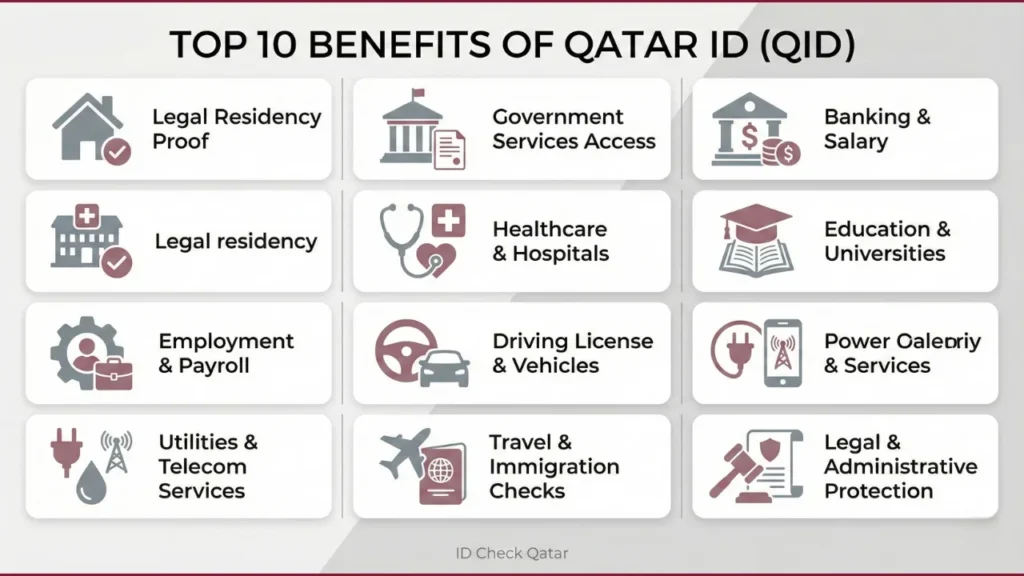
Top 10 Benefits of Qatar ID (QID) in 2026
Qatar ID (QID) is the official residency identification document issued in Qatar and is required to access government and private services such as employment, banking, utilities, and healthcare.
| Benefit | Details & Why It Matters |
|---|---|
| 1. Legal Residency Proof | Confirms your legal right to live and work in Qatar. Required for residency verification and immigration checks. |
| 2. Access to Government Services | Needed for MOI services, Metrash app, visa renewals, and all public service portals. |
| 3. Banking & Finance | Needed to open bank accounts, receive salaries, apply for loans, and access most financial services. |
| 4. Healthcare Access | Needed to access hospitals and clinics, create medical files, and apply for the Qatar Health Card. |
| 5. Education Enrollment | Mandatory for school and university admissions, record updates, and student registrations. |
| 6. Employment & Payroll | Required for work permits, job contracts, salary processing, and HR documentation. |
| 7. Driving License | Needed to apply for or renew a driving license and register a vehicle. |
| 8. Utilities & Telecom | Required to set up electricity, water (Kahramaa), internet, and SIM cards (e.g., Ooredoo, Vodafone). |
| 9. Travel & Immigration Formalities | Helps with travel verification, airport checks, and re-entry permissions. |
| 10. Legal & Administrative Protection | Prevents penalties, travel blocks, salary holds, and service interruptions caused by an expired or invalid QID. |
Quick Usage Table: Where a Valid QID Is Required (2026)
| Purpose | Requires Valid QID? | Notes |
|---|---|---|
| Banking | Yes | Required for account opening and salary. |
| Healthcare | Yes | Needed for medical files and hospital access. |
| Employment | Yes | Mandatory for work permits and contracts. |
| Education | Yes | Required for school and university admissions. |
| Utilities | Yes | Needed for setting up electricity and water. |
| Government Services | Yes | Required for all MOI and Metrash services. |
| GCC Travel | Yes | Needed for residency verification during travel. |
How to Apply for Qatar ID (QID) in 2026: Step-by-Step Guide for Expats & Residents
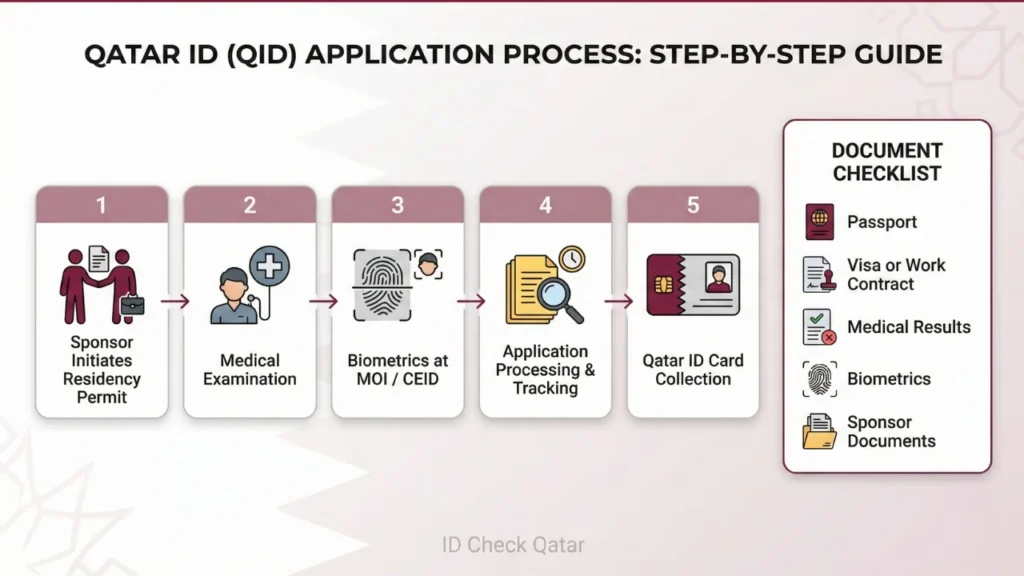
Applying for a Qatar ID is mandatory for new residents, and the process is initiated by the sponsor through the Ministry of Interior, involving documents, medical examination, and biometric registration.
Required Documents for QID Application (2026)
| Document | Details | Notes |
|---|---|---|
| Valid Passport: | Original + copy | Must be valid 6+ months |
| Entry Visa / Work Contract: | Sponsor-provided & attested | Employer submits for workers |
| Medical Exam Results: | X-ray, blood tests, HIV/TB screening | Completion time and fees depend on the approved medical center |
| Photos & Biometrics: | 2–4 passport photos + fingerprints + iris scan | Done at MOI/CEID |
| Application Form: | Printed from MOI website | Must be signed by sponsor |
| Sponsor Documents: | Company license or approval letter | Required for expats |
| Fee Receipt: | Proof of payment | Fee: QR 500 (family) or QR 1000 (company) |
Step-by-Step QID Application Process (2026)
Step 1: Sponsor Initiates Residency Permit
Your employer or family sponsor submits the residence permit request via the MOI portal or Hukoomi. Approval time varies based on the sponsor and application review.
Step 2: Complete the Medical Examination
After arrival, visit an approved medical center for the required tests. Results are issued once medical verification is completed.
Step 3: Biometrics at MOI / CEID
– Go to the MOI service center for fingerprints, photo, and eye scan.
– Your sponsor may need to attend.
– Pay the applicable Qatar ID fee based on sponsorship type.
Step 4: Application Processing & Tracking
– Processing time varies and may extend if additional verification is required.
– Track progress using the passport number under:
MOI → Inquiries → Official Documents
Step 5: Collect Your Qatar ID
– Once approved, collect your card directly from MOI, or choose Q-Post delivery, which is available for an additional charge.
– Qatar ID validity depends on the sponsorship type and approval.
Checklist
- Medical examination must be completed after arrival
- Qatar ID fees depend on sponsorship type
- Processing time varies based on verification and approvals
- Status can be checked online using passport details
- Sponsor must initiate the application process
Documents Needed for Qatar ID (QID) Check, Apply, or Renewal in 2026
Online Qatar ID status checks do not require documents, while applications, renewals, and updates require specific documents based on case type and sponsorship.
Here is a guide to MOI official documents:
For New QID Application or Renewal
| Document | Description | Notes |
|---|---|---|
| Current QID: | Required for renewal | Original + copy |
| Valid Passport: | 6+ months validity | For all applications |
| Recent Photos: | 2–4 passport-sized | White background |
| Sponsor ID / Letter: | Approval letter + contract | Expats only |
| Medical Results: | X-ray, blood, HIV/TB | Only for first-time QID |
| Fee Receipt: | Proof of payment | – |
For Information Updates (Name, Address, Photo, Sponsor Change)
| Update Type | Required Documents | Notes |
|---|---|---|
| Name Change | QID + passport + legal certificate | Must be attested |
| Address Update | QID + passport + utility bill / rental contract | Proof of residence required |
| Photo Update | QID + 2–4 photos | Biometrics may be retaken |
| Sponsor Change | QID + passport + new sponsor letter | Employer or new sponsor approval required |
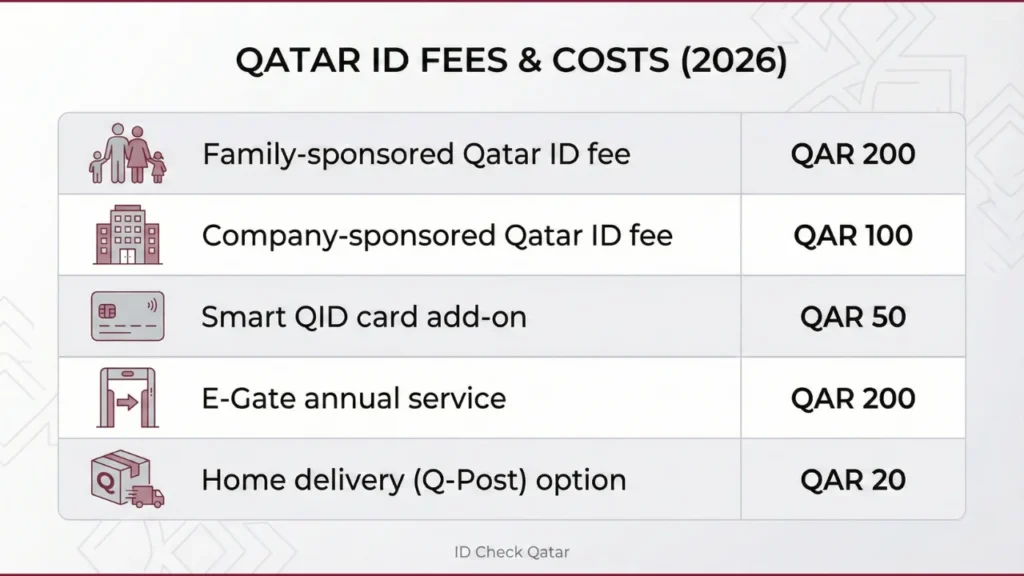
Qatar ID (QID) Fees & Costs in 2026
Qatar ID fees vary based on sponsorship type and validity period, with different costs for family and company-sponsored residents.
QID Fee Breakdown (2026)
| Fee Type | Cost (QR) | Notes |
|---|---|---|
| Standard QID – Family Sponsorship | 500 QR/year | Usually paid by sponsor |
| Standard QID – Company Sponsorship | 1000 QR/year | Employer usually pays |
| Smart QID Add-On | 100 QR | Microchip-enabled card |
| E-Gate Annual Subscription | 100 QR/year | Faster immigration gates |
| Home Delivery (Q-Post) | 20–50 QR | Optional |
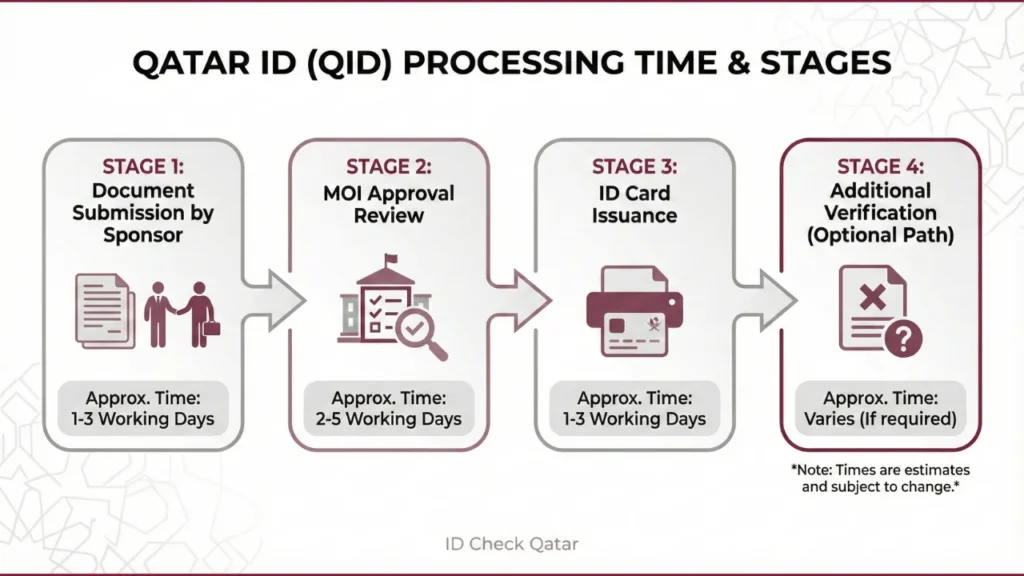
Qatar ID (QID) Processing Time in 2026
Qatar ID processing time varies based on sponsorship approval, medical examination results, and Ministry of Interior verification stages.
| Step | Typical Time | Notes |
|---|---|---|
| Submit Documents | Same day | Done by sponsor at MOI |
| Approval Processing | 1–2 weeks | Subject to MOI review |
| Card Issuance | 5–7 business days | After approval |
| Extra Requirements | Up to 3–4 weeks | If issues or mismatches |
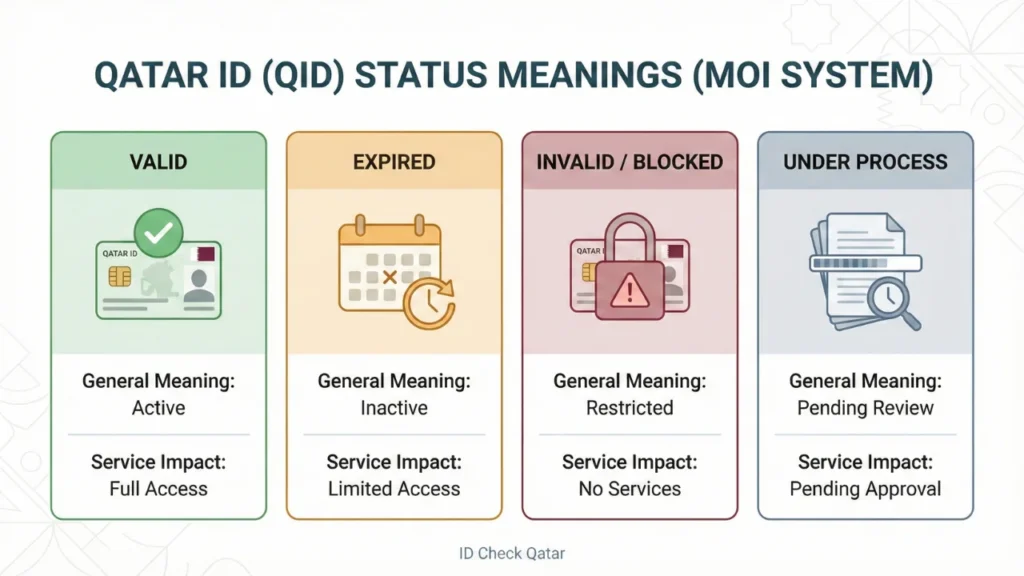
What Do Qatar ID (QID) Statuses Mean in 2026?
MOI results typically show valid, expired, invalid/blocked, or under process—each status affects services and determines what action you should take next.
Each Qatar ID status affects residency, access to services, and compliance requirements in Qatar. Keeping your QID valid helps avoid penalties and service restrictions. Regular status checks help ensure timely renewal and uninterrupted access to services.
| Status | Meaning & Causes | Impacts & Actions You Must Take |
|---|---|---|
| Valid | Active and up-to-date. No issues in MOI system. | Full access to banking, healthcare, work, travel, and government services. Renew before expiry through Metrash to avoid service interruption. |
| Expired | QID passed its renewal date. 3-month grace period, after which QR10/day fines begin. Main cause: non-renewal on time. | Banking, jobs, travel, and services may be blocked. Renew immediately through MOI or Metrash (renewal fee depends on sponsorship type). Check our Qatar ID Renewal Guide 2026. |
| Invalid | QID blocked, revoked, or data-mismatched. Causes include: sponsorship cancellation, legal issues, passport mismatch, nationality errors, or MOI system glitches. | Severe: Services may be restricted, and resolution is required through MOI with sponsor support. |
| Under Process | New application or renewal is still under MOI review. Typical cause: new residency permit or renewal submission. | Limited services (no banking/travel). Processing time varies depending on verification and approvals. Track weekly using MOI tools. If pending more than 4 weeks, contact your sponsor or the MOI support channels. |
If a Qatar ID shows invalid or cancelled status, sponsor involvement is required to resolve the issue through the Ministry of Interior.
Consequences of Invalid or Expired Qatar ID (QID) in 2026
An invalid or expired Qatar ID can restrict access to services and may require resolution through the Ministry of Interior to restore normal residency and service access.
An invalid or blocked Qatar ID is usually linked to sponsorship changes, administrative flags, or unresolved records. Resolution typically requires sponsor involvement and verification through the Ministry of Interior.
| Impact Area | Possible Consequences | Actions to Fix |
|---|---|---|
| Service Access Restrictions | Healthcare access may be limited; utilities and driving-related services may be temporarily suspended until the QID issue is resolved. | Renew/resolve via Metrash/MOI; sponsor approval needed. |
| Legal Implications | Administrative penalties, travel limitations, or further restrictions may apply if an expired or invalid QID is not resolved within the permitted grace period. | Pay fines via Metrash; visit MOI with docs/sponsor; contact MOI support channels for guidance |
| Employment Problems | Employment activities may be affected, including contract processing and payroll, until a valid Qatar ID is restored. | Notify sponsor/employer; renew first, then transfer jobs. Use our QID Renewal Guide. |
| Money Problems | Banking and financial services may be temporarily restricted until the Qatar ID is renewed or reactivated. | Renew QID to unfreeze; sponsor may cover interim. Contact bank/MOI for appeals. |
Tip: If a Qatar ID shows an invalid or blocked status, sponsor involvement is usually required to resolve the issue through the Ministry of Interior. Regular status checks help identify issues early.
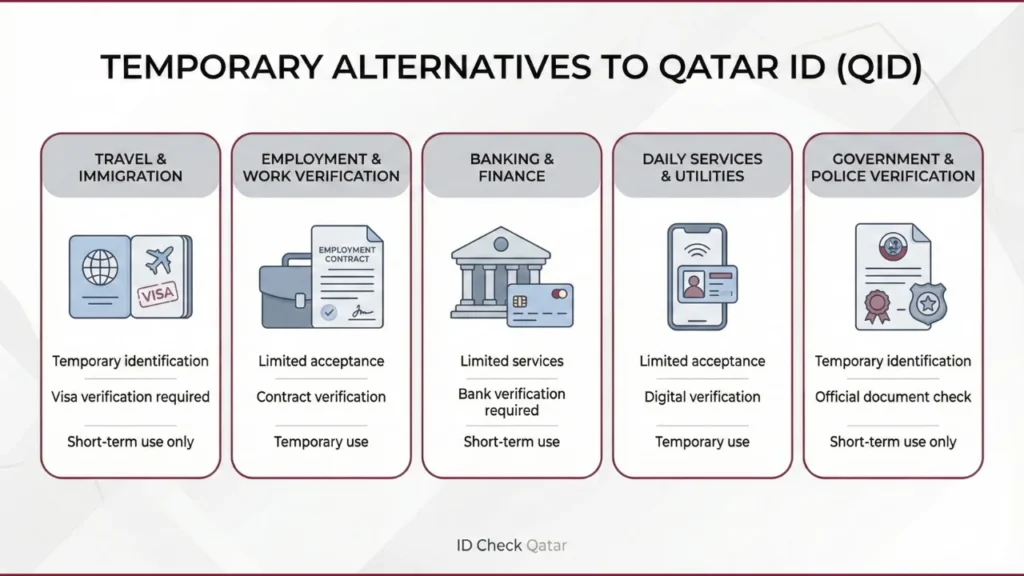
Alternatives to Qatar ID When It Is Invalid, Lost or Expired in 2026
When a Qatar ID is invalid, lost, or expired, certain temporary documents may be accepted for limited purposes until the ID is renewed or reissued through the Ministry of Interior.
These alternatives are temporary and should only be used until the Qatar ID is renewed or reissued. Digital ID access is available through the official Metrash app following recent platform updates by the Ministry of Interior.
Common Alternatives to Qatar ID by Situation in 2026
| Situation | Alternative Document | Notes and Limitations |
|---|---|---|
| Immigration and Travel | Valid passport and entry visa or entry stamp | May be accepted for short-term travel verification depending on visa status and destination. |
| Employment and Work | Work visa number and employment contract or employer letter | Confirms sponsor relationship. Accepted for payroll checks and police verification. Cannot be used to join a new job. Employer confirmation is required. |
| Banking and Finance | Passport and Hukoomi portal verification report | Accepted temporarily for basic transactions. Digital ID access through the Metrash app may be accepted for basic identity verification, depending on the service provider. |
| General and Daily Use | Metrash app digital ID or Qatar digital identity services | The digital version is accepted for most services including police, utilities and banking. The QR code can be scanned for verification. This complements Metrash in 2026 for full authentication. |
| Official Government or Police | Hukoomi verification report and passport or visa | Printed verification from Hukoomi or MOI can be used as temporary proof. Usually valid for 30 days. |
Tip: These alternatives are intended for short-term use only. Renewing or reissuing the Qatar ID through official MOI channels helps restore full access to services.
Steps to Resolve Invalid Qatar ID Issues in 2026
Invalid Qatar ID results are commonly caused by expiry, sponsorship issues, data mismatches, or temporary system delays.
For Expired ID
Check your QID status using the MOI Qatar ID check portal or the Metrash app. If your ID shows as expired, follow the steps below:
- Check Qatar ID status using the MOI portal or the Metrash app.
- Select the renewal service.
- Pay the applicable Qatar ID renewal fee.
- Upload the required documents.
- Wait for confirmation once processing is completed.
For Sponsorship Issue
A Qatar ID may become invalid if sponsorship details are outdated or not updated correctly. This often happens if you have changed jobs or your sponsor’s status has changed. To resolve this, contact your sponsor or your new employer and ask them to verify the sponsorship.
For Data Error
Sometimes errors may appear in personal details such as name spelling, date of birth, or visa number.
If you found this type of error, then go to the nearest MOI center along with official documents like QID, Passport, Employment contract, and Visa. An application form will be provided by MOI staff for correction and verification.
System Issue
Sometimes the ID shows as invalid due to technical or system errors. Clear your browser cache and cookies and try again. If the issue persists, try a different browser or contact MOI support channels for technical assistance.
Are Expatriates and Citizens Treated the Same If Their Qatar ID Is Invalid?
Rules and consequences differ for expatriates and citizens when a Qatar ID is expired, invalid, or linked to residency status.
Expatriates:
- A Qatar ID serves as both identification and proof of residency status.
- An invalid or expired QID may affect residency validity and access to employment-related services.
- Resolution usually requires sponsor involvement and verification through the Ministry of Interior.
Citizens:
- Citizens are issued a national smart ID card rather than a residency-based permit.
- An invalid ID does not affect residency status but may temporarily limit access to certain services such as healthcare, banking, or government transactions.
MOI Service Center Contact Details
E-mail: [email protected]
Phone: 2366666
Web: www.portal.moi.gov.qa
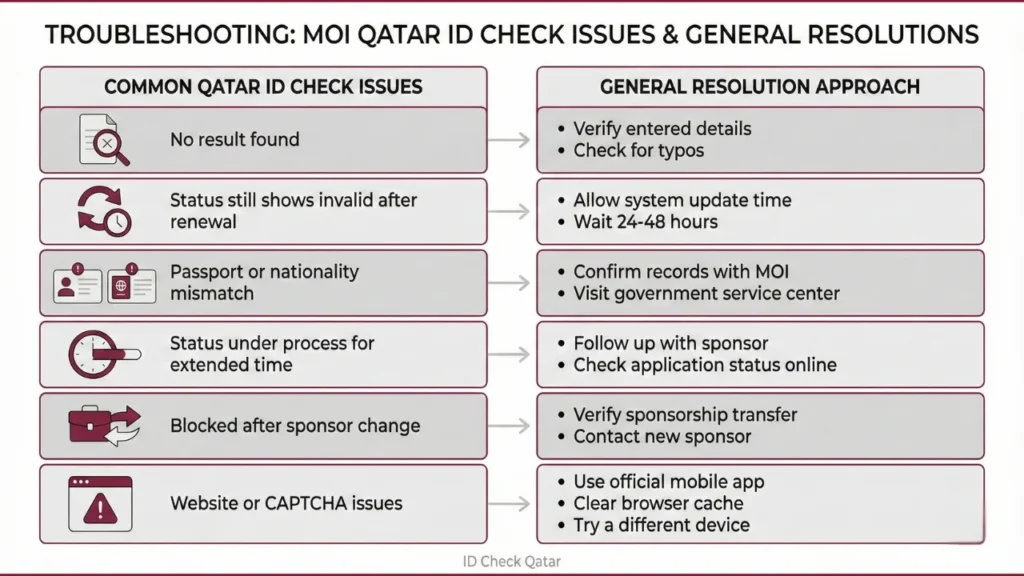
Common MOI Qatar ID Check Issues and Solutions in 2026
Most MOI Qatar ID check issues are caused by incorrect details, pending updates, or temporary system errors.
Common Qatar ID Check Problems and Solutions (2026)
| Issue | Why It Happens | Quick Fix |
|---|---|---|
| No Result Found | Incorrect QID or passport number, browser cache, or temporary system delay | Recheck details, press Reset, wait briefly, or use incognito mode. |
| Still Shows Invalid After Renewal | Temporary system update delay | Allow time for system updates, clear browser cache, or check status inside the Metrash app. |
| Mismatched Passport or Nationality Data | Passport number or nationality not updated in MOI records | Visit an MOI service center with your passport and QID for same-day correction. |
| Under Process for Weeks | Pending medical, biometrics, or sponsor approval | Contact your sponsor, visit the CEID center, or follow up via the Metrash app. |
| Blocked After Sponsor Change | Old sponsor did not release the file or update not submitted | New sponsor must submit the sponsor change request through the MOI or Metrash portal. |
| Valid in Metrash but Invalid in Bank or Portal | Banks or services are still reading old MOI data | Show the digital QID in Metrash and request the bank to refresh MOI records. |
| Website Down or CAPTCHA Loop | High traffic or routine maintenance | Use the Metrash app, or retry later during off-peak hours (after 11 PM). |
If the issue continues, contact MOI support channels or check your Qatar ID status through the Metrash app.
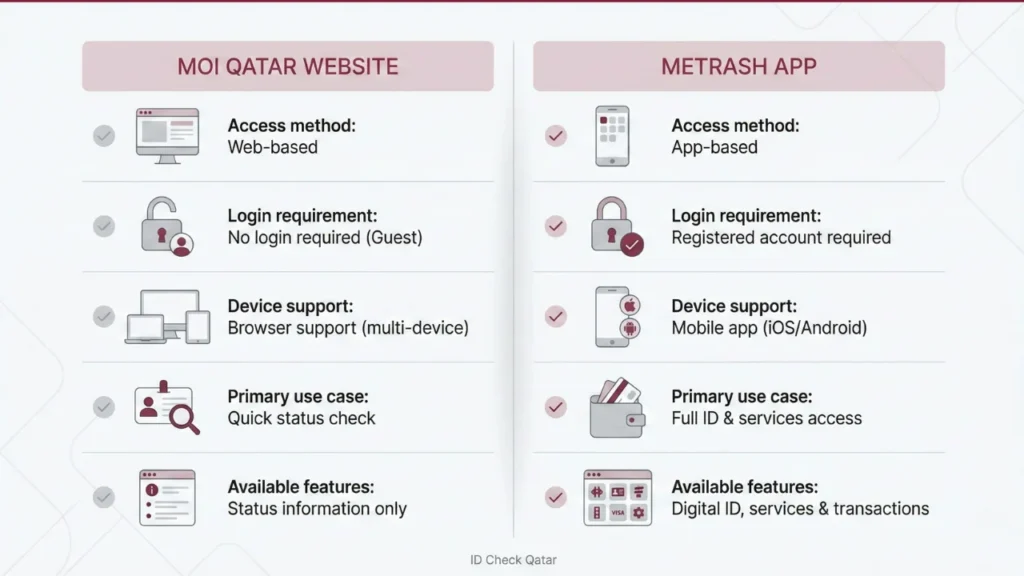
MOI Portal vs Metrash App for QID Status – Comparison
MOI is best for quick web checks, while Metrash is better for account-based services and digital ID access – this comparison shows which to use.
| Feature | MOI Qatar Website | Metrash App |
|---|---|---|
| Access: | No login required | Login required |
| Device Support: | PC, Mobile Browser | Mobile only |
| Use Case: | Quick status check | In-depth ID & service access |
| Extra Features: | Status only | QID copy, profile, traffic fines |
Qatar ID (QID) FAQs 2026
Related Articles:
Conclusion
The Qatar ID, also called the identity card, is the only document that proves your identity and helps you to get and enjoy all the government or private services smoothly. If the validity of the QID comes to an end, then you should renew it before it expires. Use MOI Qatar ID Check tools using the Ministry of Interior official website or Metrash App regularly, and it helps you avoid any problems caused by expired documents or incorrect information.